
App connections and event routing#
Use app connections and action settings to send events to the right account, separate email and SMS tools, or keep test data in test accounts. The examples below show several setups. Trigger criteria can use any suitable fields available for the action’s event, not just the fields in these examples.
Multiple app connections#
Apps such as Klaviyo and Attentive support multiple installations on one Talkable site. Each installation, or app instance, is a separate connection with its own credentials, settings, actions, payload attributes, and trigger criteria. Some other apps allow only one installation per site.
Use Install under Apps available to create each connection and authorize the intended account. Reinstall updates an existing connection; it does not create another one. For account setup, see Connect multiple Klaviyo accounts and Connect multiple Attentive accounts.
Connections send independently. Without trigger criteria, every enabled connection sends every eligible event for its enabled actions. If an event matches rules on two connections, both connections send it. To split events between accounts, add a positive rule to every enabled action on each connection.
Route events to regional accounts#
When you use separate Klaviyo or Attentive accounts for different markets, connect each account to the same Talkable site and route events by campaign tag or customer property. For example, send US events to your US account and UK events to your UK account.
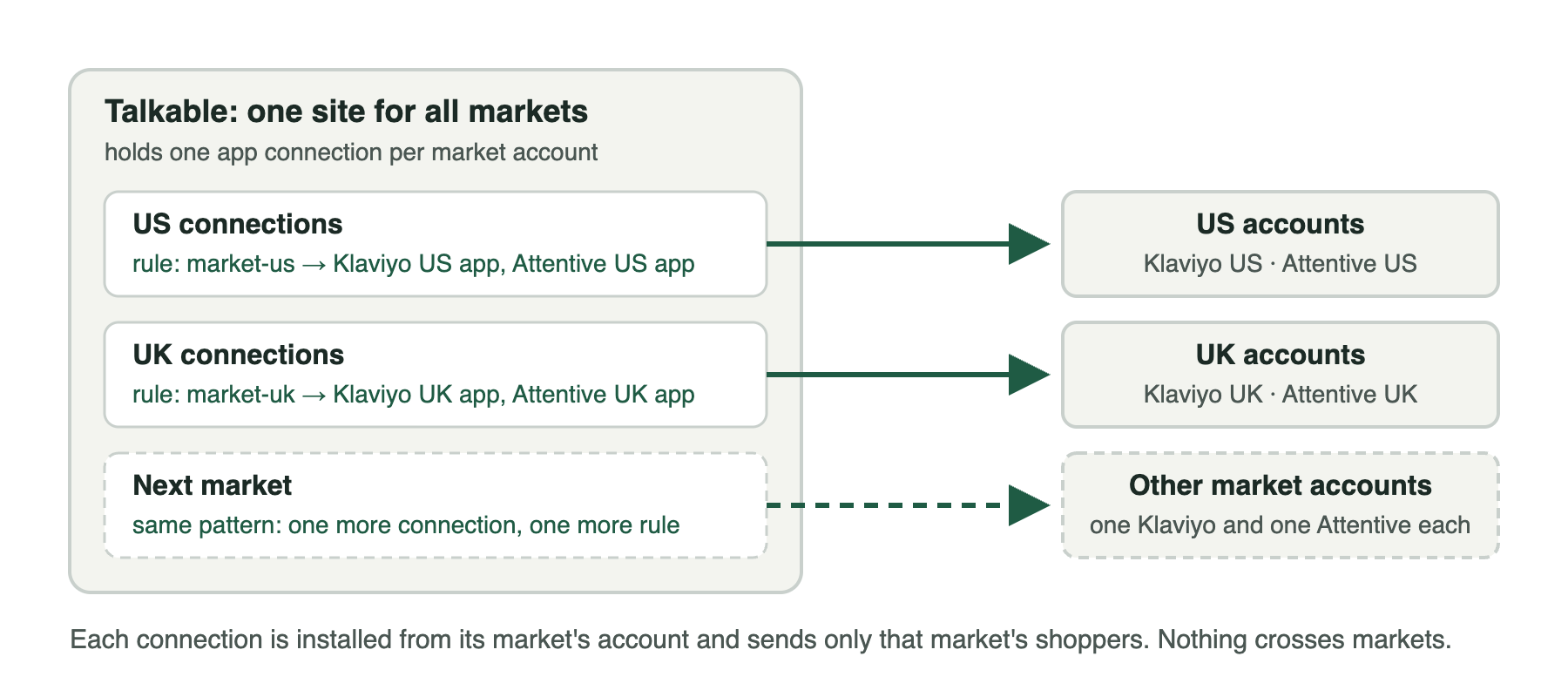
The diagram shows the intended routing after each action has been configured and tested.
Connect each market account using the Klaviyo or Attentive instructions. Configure the destination settings from that account.
Choose a field that identifies the destination. The examples below use campaign tags for separate market campaigns or a person custom property when a campaign serves several markets.
Apply the matching rule below to every enabled action on every connection.
Verify routing with matching, non-matching, and missing-market events in test accounts.
Regional routing examples#
Example |
Use when |
Required setup |
|---|---|---|
Each market has its own campaigns |
Assign each campaign its market tag |
|
One campaign serves several markets |
Pass the customer’s country to Talkable before the event; use the correct person variable for each action |
Route by campaign tag#
Use campaign tags when each market has its own campaigns. Tag the campaigns
market-us or market-uk. The examples include both live tags and the
test- tags used by campaigns in test mode. To verify routing, use test
campaigns on a separate Talkable site whose apps connect to test accounts.
On every enabled referral-program action of the US connections:
{% if campaign.tag_names contains 'market-us' or campaign.tag_names contains 'test-market-us' %}true{% else %}false{% endif %}
On every enabled referral-program action of the UK connections:
{% if campaign.tag_names contains 'market-uk' or campaign.tag_names contains 'test-market-uk' %}true{% else %}false{% endif %}
These rules apply to all three Attentive actions and the five Klaviyo
referral-program actions. Keep Klaviyo’s loyalty actions disabled for this
setup because they have no campaign variable. Assign each campaign only
the intended market tag. The test- clauses send test activity to the
connected accounts too; remove them when test activity should be excluded.
Route by customer property#
Use a customer property when one campaign serves several markets. Your
site must pass country through the Talkable integration and store
it on the relevant person before the event. Use US for the United
States and GB for the United Kingdom. See
Pass custom user data.
The property must be present for each person whose event you route, including
friends who opt in. A missing country matches neither rule. The examples use
upcase so lowercase values also match.
For Klaviyo email opt-ins, phone opt-ins, and rewards, and all Attentive actions,
use person. US connection:
{% assign market = person.custom_properties.country | upcase %}{% if market == 'US' %}true{% else %}false{% endif %}
UK connection:
{% assign market = person.custom_properties.country | upcase %}{% if market == 'GB' %}true{% else %}false{% endif %}
For Klaviyo offer shares, use sharer. US connection:
{% assign market = sharer.custom_properties.country | upcase %}{% if market == 'US' %}true{% else %}false{% endif %}
UK connection:
{% assign market = sharer.custom_properties.country | upcase %}{% if market == 'GB' %}true{% else %}false{% endif %}
For Klaviyo referral approvals, route by the advocate’s property using
advocate_person. US connection:
{% assign market = advocate_person.custom_properties.country | upcase %}{% if market == 'US' %}true{% else %}false{% endif %}
UK connection:
{% assign market = advocate_person.custom_properties.country | upcase %}{% if market == 'GB' %}true{% else %}false{% endif %}
Keep Klaviyo loyalty actions disabled in this setup; they use member_info
instead of these person variables.
Verify routing#
Generate events through test campaigns on a separate Talkable site used for testing, with its apps connected to test accounts. Enable the app and the actions being tested on that test site. Test every enabled action with a matching market, a different market, and a missing market value. Check that each event reaches only the intended account. With the US and UK rules above, other markets and missing values should reach neither account.
Send sample payload checks the connection and sample payload, but skips trigger criteria. Use actual test events to verify routing.
Email in one tool, SMS in another#
For a setup using Klaviyo for email and Attentive for SMS:
Enable Klaviyo’s Sync email opt-ins.
Disable Klaviyo’s Sync phone opt-ins to avoid subscribing the same phone in both tools.
Enable Attentive’s Phone optin. Leave Sync email and phone sign ups disabled if you use Phone optin, since both can send a subscription for the same sign-up.
Attentive’s subscription actions can send both email and phone when the person has opted in to both.
Separate test and production accounts#
Use a separate Talkable site for testing and connect it to a test account. Connect the production site to its production account. A connection sends data to whichever external account authorized it, including activity from test campaigns and sample requests.
Use Testing a connection to check sample data, then verify routing with actual test events. For an Attentive test account, see Connect multiple Attentive accounts.
Filter events by campaign or channel#
To send one campaign’s opt-ins to a particular Klaviyo list, configure that action’s List ID and add a campaign-ID rule from Trigger criteria. For a separate destination account, configure the rule on that account’s installation.
To send rewards only for campaigns with a given tag, apply the campaign-tag
rule to the reward action. To limit offer-share events by channel, use the
channel_identifier variable, which is available on the offer-share action.
Add details for a reward flow#
Klaviyo’s Track reward issued in Klaviyo action does not send a coupon code
by default. Add coupon_code with value {{ coupon.code }} to its payload
to include it in the event used by your reward flow. You can also add
campaign_name with value {{ campaign.name }}.
Attentive’s Distribute reward action already includes coupon fields. See Payload attributes and variables for adding fields to individual actions.