
Custom App#
Custom App sends Talkable event data to an endpoint you provide as HTTP POST requests with a JSON body. Use it to connect your own system or an external tool that accepts these requests. Each installation has one Endpoint URL; you can install separate connections for different endpoints and route events to each one.
Configure actions, payloads, and trigger criteria for the events you need. Custom App also has two actions that check a response before a reward or email decision. For the event-variable reference, see Events and actions.
Connect Custom App#
Open Site Settings → App Store, find Custom app under Apps available, and click Install.
Enter your Endpoint URL and, optionally, an App name to identify this connection. The endpoint is shared by all actions in the installation. Click Show next step to open the actions.
Turn on the actions you need to reveal their settings. Add their payload fields, request headers, and any trigger criteria. Click Complete installation.
On the installed app page, keep the app disabled while testing. Save any further action changes with Save changes, then use Send sample payload on each action and check the request received by your endpoint.
Enable the app when you are ready for automatic sending. Enabling an action alone does not start automatic sending while the app is disabled.
Use a publicly reachable HTTPS endpoint with a valid certificate. Talkable
rejects localhost and private or reserved IP addresses. Use a test endpoint
and test credentials during setup. A sample is a real request, even while the
app is disabled. It does not evaluate trigger criteria;
verify those separately with test events before enabling a production connection.
Request headers and timeouts#
Add these settings as custom rows in the action’s Payload attributes table, then click Save changes. Configure them on each action that needs them. Custom App removes these settings from the JSON body and uses them for the HTTP request.
Attribute name |
Example value |
Effect |
|---|---|---|
|
|
Sends an Authorization header |
|
|
Sends an X-Api-Key header |
|
|
Allows up to 20 seconds for an ordinary event request |
Replace the credential placeholders with the values required by your endpoint. Custom App does not perform an OAuth sign-in or refresh a token for you; update credentials in the affected actions when your endpoint requires it.
Use headers[Header-Name] for other custom headers. Talkable manages the
JSON content type, request signature, and transport headers; do not override
those fields. Use valid header names and single-line values; Save changes
rejects reserved names, invalid names, and values containing line breaks.
If a Liquid variable renders a line break in a header value, delivery fails.
Headers are a Custom App feature, not a general way to change requests made
by other App Store integrations.
Ordinary event requests have a 10-second default timeout. Set
_request_timeout to a whole number from 1 to 60 seconds. The two
response-check actions
have a 1-second default and allow 1 to 10 seconds. Save changes rejects
fixed timeout values outside the allowed range.
Payloads#
Use Payload attributes and variables to add fields, override a predefined field with a custom row of the same name, or build JSON objects and arrays. For nested arrays, separate adjacent brackets with spaces as shown in Objects and arrays. Blank rendered values are omitted.
For example, on the Event action, add event_id with value
{{ origin.id }} and customer with this value:
{"email": {{ person.email | json }}, "country": {{ person.custom_properties.country | json }}}
The event ID can help your endpoint recognize repeated deliveries. Failed notification requests can be retried, so the endpoint should handle the same event more than once without duplicating its effects.
For ordinary notifications, return a 2xx HTTP status; no response body is required. HTTP errors and timeouts are treated as failed deliveries and can be retried. The response-check actions below require a JSON result instead.
Available actions#
These are Custom App’s event notification actions. Use Show available variables on each enabled action to see the fields available for its payload and trigger criteria. The predefined fields below appear as read-only rows in Payload attributes. Blank values are omitted; you can add custom rows to override a field or include more data.
Action |
Sends a notification when |
Default fields |
|---|---|---|
Sync signups |
An advocate or friend signs up, whether or not they opt in |
|
Sync email opt-ins |
A person opts in to email |
|
Sync phone opt-ins |
A person opts in to text messages |
|
Unsubscribe |
A person unsubscribes from Talkable emails |
|
Offer share |
An advocate shares an offer |
|
Send reward |
A reward is paid, excluding loyalty points |
|
Create coupon |
Talkable generates a coupon to send to your store |
|
Event |
A new Event or Purchase is registered |
|
Refund |
A refund is created |
|
Referral create |
A referral is created |
|
Referral status change |
A referral changes status |
|
Sync loyalty actions |
A loyalty member performs an action |
|
Sync loyalty tier transitions |
A member changes loyalty tier |
|
Send wallet install event |
An eligible wallet pass is registered; replaces the wallet welcome email. See conditions below |
|
For event variables and the distinction between registered purchases and custom event categories, see Events and actions.
Wallet install events and welcome emails#
With Custom App and Send wallet install event enabled, Talkable publishes the event instead of sending its wallet welcome email. Configure your endpoint or connected tool to send that email if you need it.
Talkable chooses the event before checking the action’s trigger criteria. If a rule skips the event, Talkable does not send a fallback wallet welcome email.
This applies when a person’s pass linked to a campaign offer is registered and has no other device registrations. Campaigns using wallet-install email verification do not publish this event.
Response checks#
Two additional actions use your endpoint’s JSON response to answer a question:
Action |
Return value |
If the check fails or times out |
|---|---|---|
Click reward verification |
|
The reward is considered verified |
Check Unsubscribed |
|
The person is considered subscribed |
For Click reward verification, the campaign’s incentive criteria must use
click_reward_verified to reject an unverified reward. This action provides
friend_info, campaign, and site as payload variables. Its default
payload fields are email and site_id.
Check Unsubscribed runs before Talkable sends an email and provides
person, campaign, site_id, and email_type. Its default payload
fields are site_id, email, campaign_id, and email_type. When
the app and this action are enabled, Talkable uses this check instead of the
Check Unsubscribe webhook.
Each check has a field that selects a value from its JSON response: Path to the boolean with the verification result for reward verification, or Path to the boolean with the unsubscribed state for unsubscribe checks. For example, if the endpoint returns:
{"result": {"unsubscribed": true}}
Set the unsubscribed-state path to result/unsubscribed. For a verification
response such as {"result": {"issue_reward": true}}, use
result/issue_reward. Leave the path empty only when the endpoint returns
true or false at the root. Check the current field value: the
unsubscribe action defaults to result/unsubscribed.
Test the response format as well as connectivity. These checks use a 1-second
default timeout; use _request_timeout to set up to 10 seconds if needed.
Webhook Signature Verification#
Each request has the x-talkable-signature header. Verify it to make sure the request comes from Talkable and was not changed.
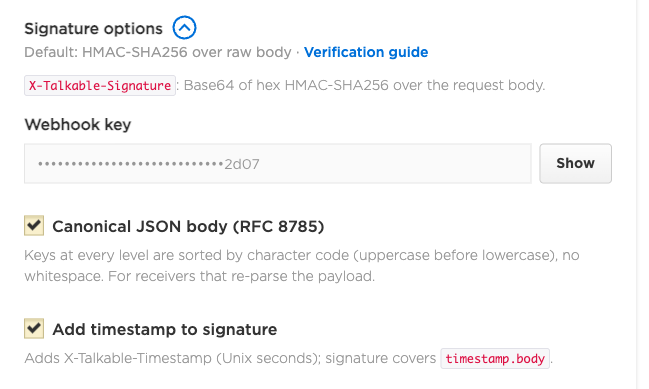
Set up signing on the Custom App settings page:
Open the app in the App store. In the Settings card, expand Signature options (after App name).
Click Show, then Copy, to get the webhook key. Show is available to a user with write and PII access.
Choose the options. Both are off by default, and existing apps keep their current requests.
Canonical JSON body (RFC 8785): Talkable sends the body as canonical JSON. Use it when your receiver gives you only parsed JSON.
Add timestamp to signature: Talkable adds the x-talkable-timestamp header and signs it together with the body. Use it to reject replayed requests.
Click Save changes.
Click Send sample payload near any action. The result shows the request headers (x-talkable-signature, and x-talkable-timestamp when that option is on) and the request payload. The payload is formatted for reading; verify against the body your endpoint receives.
Verify the signature in your endpoint. See the examples.
Update your receiver before you turn an option on. After you turn it on, a receiver that does not expect the new format rejects every request.
How Talkable builds the signature:
The message is the raw request body. With Add timestamp to signature on, the message is the x-talkable-timestamp value, a dot, and the raw body.
The signature is the Base64 encoding of the lowercase hex HMAC-SHA-256 digest of the message, keyed with the webhook key. Talkable encodes the 64-character hex string, not the raw 32 digest bytes.
To verify, use the request body bytes exactly as received. Do not parse the JSON and serialize it again: key order, spaces and escaping can change, and the signature will not match. Compare your signature with the header value in constant time.
Canonical JSON body (RFC 8785)#
With this option on, Talkable sends the body as RFC 8785 canonical JSON and signs that string:
Object keys are sorted at every level, by UTF-16 code units.
There are no spaces or line breaks.
Strings and non-integer numbers follow the RFC 8785 rules (the same output as JavaScript
JSON.stringify). Integers are sent with all their digits.
The body is still the exact string that was signed, so raw-body verification works as before.
Use this option when your receiver gives you only parsed JSON, for example Segment Source Functions, Zapier or Make. Build the string again with the canonicalize function from the Node example below, then verify it.
Do not use JSON.stringify(sortKeysDeep(JSON.parse(body))) instead. JavaScript objects put integer-like keys such as "10" and "2" first, in numeric order, and a __proto__ key does not survive a copy into a new object. The result then differs from the body that Talkable signed.
Number caveats:
Talkable sends every integer with all its digits, including integers above 2^53 and of 10^21 or more. JavaScript reads numbers as 64-bit floats, so
JSON.parserounds such an integer, andJSON.stringifywrites 10^21 or more with an exponent. The rebuilt string then differs. Keep ids and other large numbers as strings in custom attributes.Python
json.dumps(data, sort_keys=True, separators=(',', ':'), ensure_ascii=False)gives the same string for payloads of strings, booleans, nulls and integers, when keys have no characters outside the Basic Multilingual Plane (for example, emoji). It formats floats differently. In Python, verify over the raw body.
Add timestamp to signature#
With this option on, each request has the x-talkable-timestamp header. Its value is the send time in Unix seconds, for example 1762070400. The signed message is the timestamp, a dot, and the body:
1762070400.{"email":"person@example.com","site_id":"1"}
Use the timestamp to reject replayed requests:
Reject a request when its timestamp differs from your current time by more than 300 seconds.
Each delivery attempt, including a retry, has a new timestamp.
Set
REQUIRE_TIMESTAMPto true in the examples below after deliveries carry the header. Then reject requests without the header. Until you do this, a captured request without a timestamp can still be replayed.
Custom request headers#
A custom header set with headers[Header-Name] (see Request headers and timeouts) is not part of the body or the signature.
While Add timestamp to signature is on, headers[x-talkable-timestamp] is dropped and Talkable sends its own value. With the option off, the custom header is sent as configured, but it is not signed. The examples below treat any x-talkable-timestamp value as signed, so give an unsigned custom timestamp header another name.
Examples#
Each example takes the raw body, the x-talkable-signature value and the optional x-talkable-timestamp value. It works with both options.
Ruby (in Rails, pass request.raw_post):
require 'base64'
require 'openssl'
require 'active_support/security_utils'

WEBHOOK_SECRET_KEY = 'my_webhook_secret'
TOLERANCE_SECONDS = 300
# Set to true once "Add timestamp to signature" is on and deliveries carry the header.
REQUIRE_TIMESTAMP = false

# timestamp is the x-talkable-timestamp header value, or nil when absent.
def verify_webhook(raw_body, header_signature, timestamp = nil)
  return false if REQUIRE_TIMESTAMP && timestamp.to_s.empty?

  message = raw_body
  if timestamp
    return false unless timestamp.match?(/\A\d+\z/) && (Time.now.to_i - timestamp.to_i).abs <= TOLERANCE_SECONDS
    message = "#{timestamp}.#{raw_body}"
  end
  calculated = Base64.strict_encode64(OpenSSL::HMAC.hexdigest('sha256', WEBHOOK_SECRET_KEY, message))
  ActiveSupport::SecurityUtils.secure_compare(calculated, header_signature.to_s)
end
Node (raw body, for example express.raw({ type: 'application/json' })):
const crypto = require('crypto');

const WEBHOOK_SECRET_KEY = 'my_webhook_secret';
const TOLERANCE_SECONDS = 300;
// Set to true once "Add timestamp to signature" is on and deliveries carry the header.
const REQUIRE_TIMESTAMP = false;

function sign(message) {
  const hex = crypto.createHmac('sha256', WEBHOOK_SECRET_KEY).update(message).digest('hex');
  return Buffer.from(hex).toString('base64');
}

// rawBody: string or Buffer exactly as received. timestamp: x-talkable-timestamp, or undefined.
function verifyWebhook(rawBody, headerSignature, timestamp) {
  if (REQUIRE_TIMESTAMP && !timestamp) return false;
  let message = rawBody;
  if (timestamp !== undefined && timestamp !== null) {
    if (!/^\d+$/.test(timestamp)) return false;
    if (Math.abs(Math.floor(Date.now() / 1000) - Number(timestamp)) > TOLERANCE_SECONDS) return false;
    message = Buffer.concat([Buffer.from(`${timestamp}.`), Buffer.from(rawBody)]);
  }
  const expected = Buffer.from(sign(message));
  const received = Buffer.from(headerSignature || '');
  return expected.length === received.length && crypto.timingSafeEqual(expected, received);
}
Node, parsed JSON only (for example, a Segment Source Function). Turn on Canonical JSON body (RFC 8785). The function uses verifyWebhook from the example above. Segment has no require and provides crypto as a global, so leave out the const crypto = require('crypto'); line there:
// RFC 8785 for JSON values: sorted keys, no whitespace, JSON.stringify for strings and numbers.
function canonicalize(value) {
  if (Array.isArray(value)) return `[${value.map(canonicalize).join(',')}]`;
  if (value !== null && typeof value === 'object') {
    const members = Object.keys(value).sort().map((key) => `${JSON.stringify(key)}:${canonicalize(value[key])}`);
    return `{${members.join(',')}}`;
  }
  return JSON.stringify(value);
}

async function onRequest(request, settings) {
  const body = canonicalize(await request.json());
  const valid = verifyWebhook(
    body,
    request.headers.get('x-talkable-signature'),
    request.headers.get('x-talkable-timestamp') ?? undefined,
  );
  if (!valid) throw new ValidationError('Invalid Talkable signature');
  // ...
}
Python (in Flask, pass request.get_data()):
import base64
import hashlib
import hmac
import time

WEBHOOK_SECRET_KEY = b'my_webhook_secret'
TOLERANCE_SECONDS = 300
# Set to True once "Add timestamp to signature" is on and deliveries carry the header.
REQUIRE_TIMESTAMP = False


def sign(message: bytes) -> bytes:
    hex_digest = hmac.new(WEBHOOK_SECRET_KEY, message, hashlib.sha256).hexdigest()
    return base64.b64encode(hex_digest.encode())


def verify_webhook(raw_body: bytes, header_signature: str, timestamp: str | None = None) -> bool:
    if REQUIRE_TIMESTAMP and not timestamp:
        return False
    message = raw_body
    if timestamp is not None:
        if not (timestamp.isascii() and timestamp.isdigit()):
            return False
        try:
            if abs(time.time() - int(timestamp)) > TOLERANCE_SECONDS:
                return False
        except (ValueError, OverflowError):
            return False
        message = timestamp.encode() + b'.' + raw_body
    return hmac.compare_digest(sign(message), (header_signature or '').encode())
Whitelisting Talkable IPs#
If your endpoint is behind a firewall, allow requests from Talkable’s IP addresses. Share this list with your network administrator:
|
|
See also Migration from Webhooks to Custom App.